
RSS feeds have never been my thing. I have a knack for forgetting about them and hence, never bothering to check, even though I might like the site I'm subscribed to. Many people just haven't really developed a routine for checking their RSS, despite decent efforts.
This is the idea behind Feed My Inbox, an innovative website that allows you to get email updates on what's happening in any RSS feed. If you're saying to yourself, "Well, what's the point of that? It takes the same amount of time to check your email as it does to check RSS," then this probably isn't the tool for you. This is a tool for people who just can't seem to get used to delving into their RSS feeds every day.
On the other hand, most internet users have developed a routine for checking their email regularly. Feed My Inbox is perfect for people who prefer email over RSS.
When you enter their homepage, you'll see a simple interface; there will be a form asking you to enter the web page that you'd like to subscribe to as well as, obviously, your email address.
As soon as you press "Submit", you'll be sent a confirmation email that has simple instructions: Either click on the first link to be officially subscribed to your desired feed or click on the second link to be unsubscribed.
However, if multiple feeds are found on the page you specified, you will be prompted to select the ones you would like to subscribe to using a checklist. Then, click "Confirm", and you will be sent the same confirmation email.
Subsequent to clicking the confirmation link, you will receive any updates to the feed you subscribed to, by email.
In addition, if you want to be able to manage your feeds in a neater way, you can create an account with Feed My Inbox.
Also, if you manage a website or blog, you can create an easily accessible form that allows visitors to quickly subscribe to your RSS feed by email. (You can subscribe to my blog by email, through Feedburner's widget on the left.)
And if you're hungry for even more convenience, this page provides a "Bookmarklet", which is a link you can add to your bookmarks and click whenever you are on a website that you want to subscribe to by email. This will take you right to the Feed My Inbox confirmation without any entering URLs or email addresses.
Wow, that's a lot of features for such a small service. And that's the magic of Feed My Inbox, the site that lets you convert RSS to email.
Showing posts with label free rss feeds. Show all posts
Showing posts with label free rss feeds. Show all posts
Friday, July 17, 2009
Subscribe to All of Your Favorite RSS Feeds- By Email: Feed My Inbox
Cool people comment. Be a cool person. Please comment.

Sunday, April 12, 2009
Track Changes to Any Site, Without RSS: Create an RSS Feed with Feedity
Finding a new site is always fun, especially when it's actually has some use. But having to check for changes every single day isn't. You're probably thinking, "RSS feeds, idiot!" The thing is though, that not every website has one of these little things. But you don't have to worry about that anymore with Feedity. Yes, you probably have never heard of this page before and not many have, but boy can it be useful.
Say, you're a mechanic or something of the sort, and want to track anything new at GM. Naturally, you would go to GM's corporate site, and naturally, you would find that the RSS feed button is greyed out (meaning that there's no feed for those of you who don't know). Then you're thinking, "Screw this, I don't need some stupid GM site to stay on top of things." Of course, because GM is the best car manufacturer that has ever existed (better than your Toyota and Honda), you do happen to need to know what's happening at GM.
So you go over to Feedity! The first thing you'll see is a little bar where you enter the URL of the website you want to track. Therefore, you just enter your little "gm.com" after the http://.
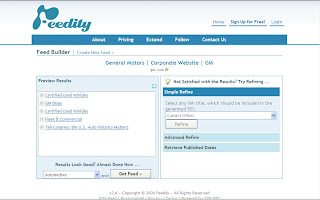
Subsequently, you can click the preview button and quickly, Feedity will generate a preview of what will be included in your feed. Of course, you can apply any changes you might want to apply to your new feed, selecting a specific part of the GM page that you want to look at with the "Refine" section. You might want to keep track of "Current Offers", the "Help Center" or perhaps the "GM Heritage Center". You can even enter an "Advanced Refine", which allows you to select the exact HTML tags you want your new feed(ity) to track the content between- that is, if you're into that sort of stuff.
Finally, you just select a category, obviously, "Automotive", press "Get Feed" and you're pretty much done!
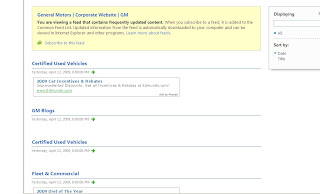
When you do this, they'll immediately provide you with a link that leads you to another page, which will be your generated RSS. Plus, you can subscribe to this feed using your Google Reader, My Yahoo!, Bloglines and more. And if you create a free account, you can save this feed to your account, get more frequent updates and make multiple feeds.
But don't be turned off by the "Pricing" tab; it's all a free service as long as you're not asking for a 99.5% uptime, 100 items per feed, advanced statistics and updates every half hour (if that's what you're interested in, you'll have $369 less to spend on premium auto parts).
And trust me, you'll be this enthusiastic too, once you visit this free RSS feed generator.
Say, you're a mechanic or something of the sort, and want to track anything new at GM. Naturally, you would go to GM's corporate site, and naturally, you would find that the RSS feed button is greyed out (meaning that there's no feed for those of you who don't know). Then you're thinking, "Screw this, I don't need some stupid GM site to stay on top of things." Of course, because GM is the best car manufacturer that has ever existed (better than your Toyota and Honda), you do happen to need to know what's happening at GM.
So you go over to Feedity! The first thing you'll see is a little bar where you enter the URL of the website you want to track. Therefore, you just enter your little "gm.com" after the http://.

Subsequently, you can click the preview button and quickly, Feedity will generate a preview of what will be included in your feed. Of course, you can apply any changes you might want to apply to your new feed, selecting a specific part of the GM page that you want to look at with the "Refine" section. You might want to keep track of "Current Offers", the "Help Center" or perhaps the "GM Heritage Center". You can even enter an "Advanced Refine", which allows you to select the exact HTML tags you want your new feed(ity) to track the content between- that is, if you're into that sort of stuff.
Finally, you just select a category, obviously, "Automotive", press "Get Feed" and you're pretty much done!

When you do this, they'll immediately provide you with a link that leads you to another page, which will be your generated RSS. Plus, you can subscribe to this feed using your Google Reader, My Yahoo!, Bloglines and more. And if you create a free account, you can save this feed to your account, get more frequent updates and make multiple feeds.
But don't be turned off by the "Pricing" tab; it's all a free service as long as you're not asking for a 99.5% uptime, 100 items per feed, advanced statistics and updates every half hour (if that's what you're interested in, you'll have $369 less to spend on premium auto parts).
And trust me, you'll be this enthusiastic too, once you visit this free RSS feed generator.
Cool people comment. Be a cool person. Please comment.
Subscribe to:
Posts (Atom)

 Posts
Posts


